


Rhythm Music - Offline Player
3.853.00 Reviews
App Specs
- Version
- 1.2.8
- Updated On
- License
- Free
- Downloads
- 10,000,000+
- Developer
- Photos & Videos Download Tools
- Categories
- Music & Audio
- Platform
- Android
Screenshots
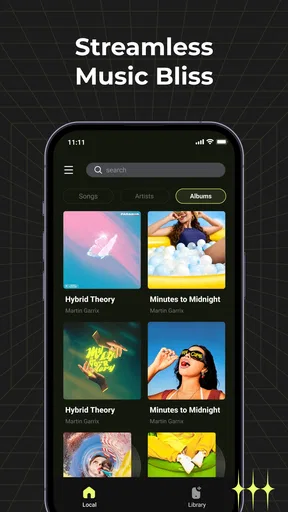
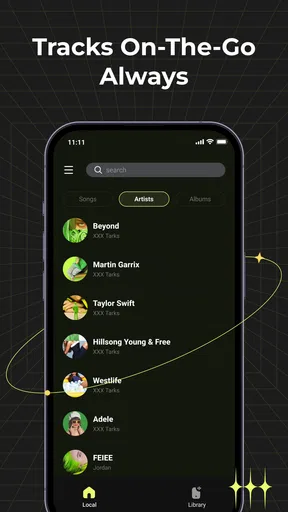
 Analysis by AppCompare
My starting point with Rhythm Music - Offline Player is simple: I want music to be available when I’m away from a reliable connection, without turning listening into a project. That makes this Android music and audio app an appealing idea for a commute, a workout, or a trip where mobile service may come and go. It’s free, rated for Everyone, and comes from Photos & Videos Download Tools. The app has a 4.1 average from around 4,200 ratings and has passed 5 million installs, so it has attracted a sizeable audience.
Before relying on any offline player, I’d first check what music is already on my device and whether it is stored locally. An offline player is useful for playing accessible files without streaming, but it is not the same thing as a service that supplies a subscription catalogue. That distinction matters: if your listening depends on music you have not saved on the phone, this may not replace your usual streaming app. I’d treat it as a way to organize and play a local collection, rather than assume it will fetch tracks for me.
A practical listening routine
In my experience, the sensible workflow is to open the player before leaving home, find the music available on the device, and choose what I want to hear for the next part of the day. For a workout, I’d make that choice before starting rather than fiddle with the phone between sets. For travel, I’d check a few familiar tracks while still connected, then switch to offline listening once I’m on the move. That small check helps avoid discovering at the station or trailhead that the music I expected is not actually stored locally.
One useful habit is to think in terms of the whole listening session, not only individual songs. A short commute, a long journey, and a run call for different choices, and the best preparation is to confirm that the files you want are accessible before you leave. If you share a device or move music between folders, it is worth checking the collection again after those changes. That is a practical safeguard, not a special feature: offline playback is only as dependable as the music the device can see.
Getting Started with the Beat
First off, setting up Rhythm Music - Offline Player is as easy as pie. Once you download it from the app store (links are right here on our site), you’ll be up and running in no time. The interface is super user-friendly, and I didn’t have to rack my brain trying to figure out where everything was. It’s all laid out in a neat and intuitive way.
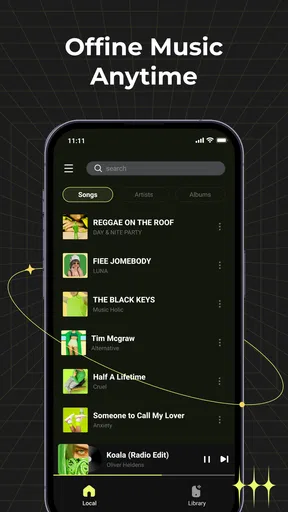
What really caught my eye was the seamless integration of my existing music library. The app scanned my device and instantly organized my tunes by artist, album, and genre. It even picked up on some of my more obscure tracks, which was a pleasant surprise!
Features That Keep You Grooving
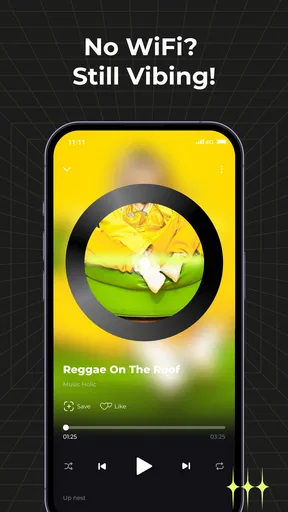
Now, let’s talk features because this app is packed with them. The standout for me is the offline capability. I mean, how many times have you been stuck without Wi-Fi, yearning for your favorite tracks? With this app, you’ll never have that problem again. Just download your playlists in advance, and you’re set to groove anywhere, anytime.
Worth Reading Before You Choose

EA SPORTS FC Mobile 26 Is a Bigger Football Game, but It Takes Time

Flipboard Shows What News Apps Must Do Beyond the Feed

Switching to Android Auto Means Rethinking Your Driving Routine

Google Calendar Makes a Crowded Week Easier to Manage

Ludo King Makes the Most of the Minutes Between Plans

Baby Panda World Brings Quick Play to Modern Phones, but Its Game Library Feels Busy
Another cool feature is the equalizer. It’s got a bunch of presets to choose from, but if you’re like me and want to tweak every little detail, you can manually adjust the settings to get the sound just right. Whether you’re into bass-heavy hip-hop or crystal-clear classical, this app’s got your back.
Oh, and did I mention the sleep timer? It’s a lifesaver for those who love to drift off to their favorite tunes without worrying about draining the battery overnight. Just set it, forget it, and dream away to your personal soundtrack.
Making the handoffs work
The most useful point to remember is where control changes hands: your phone supplies the music, while the player handles listening. That makes the app a better fit for people who already keep audio files on their device than for listeners who expect an online catalogue, recommendations, or a cloud library to follow them from one device to another. If you are switching from a streaming service, keep that service for discovery and use this player for the tracks you actually have saved.
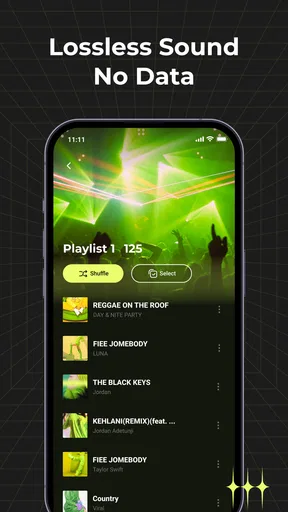
There is a similar trade-off with playlists. A playlist is only dependable offline if its music is available to the player locally. I would test the exact set I plan to use before a flight, a long drive, or a workout in a place with weak reception, rather than assume a playlist name means every track is ready. That quick check is especially worthwhile when a collection includes files added at different times or from different sources.
The app’s equalizer gives me a reason to adjust sound for the situation rather than leave one setting in place. A preset is the quicker choice when I want to start listening, while manual changes make sense if a particular pair of headphones sounds too boomy or thin. I’d change one thing at a time and listen to a familiar track; that makes it easier to tell whether the adjustment helps, and easier to return to a comfortable sound later.
Where it fits in a music setup
Compared with a typical streaming app, an offline player’s strength is direct access to music that is already on the phone, without making a connection the centre of the session. Its limitation is the flip side: it cannot be treated as a substitute for a large online catalogue unless your own local collection already covers what you want. Compared with the basic player built into a phone, Rhythm Music is worth considering if its library organization, equalizer, and sleep timer suit your routine. If you only need to tap a file and play it, a built-in option may be enough.
A realistic day for me would start with checking a saved workout selection at home, then using the player during exercise without depending on a gym’s signal. Later, the same local collection could provide background music while I wind down, with the sleep timer helping me avoid leaving playback running all night. These are different listening situations, but both benefit from deciding in advance what I want to hear and confirming that the phone can access it.
It is also a sensible choice for someone who prefers a straightforward local library over recommendations and constant browsing. On the other hand, I would skip it as my main music app if I rely on streaming for nearly everything, frequently discover unfamiliar artists through curated suggestions, or need one library to stay synchronized across several devices. In those cases, a streaming service is likely to be the more convenient centre of the setup, with this kind of player serving only as a companion for local files.
Performance and User Experience
Performance-wise, the app runs like a charm. I haven’t experienced any lag or crashes, which is a huge plus. The developers keep it updated regularly, ironing out any bugs and adding new features. It’s clear they’re committed to providing a top-notch experience.
And let’s not forget about design. The app is sleek and modern, with a dark mode option for those late-night sessions. Navigation is a breeze, and I appreciate the little touches like album art display and customizable themes.
The version available is 1.2.5, and it works on Android 8.0 and later. It was released on May 28, 2025, so I’d still make a quick test of the library and playback on my own phone before making it part of a routine that depends on offline access. A newer version can improve an app, but for everyday use the key question is simpler: can it find and play the files I actually want to hear?
One small point of friction in any local-library workflow is that the player and the music collection are not the same thing. If a track is missing, incorrectly tagged, or stored somewhere the app does not show, adjusting playback settings will not solve the underlying problem. I’d first check the file and its placement, then reopen the library and try again. That order saves time and avoids mistaking a collection issue for a player issue.
Final Thoughts
In a nutshell, Rhythm Music - Offline Player is a solid choice for anyone looking to amp up their music-listening experience. It’s packed with features that cater to both casual listeners and audiophiles alike. Whether you’re commuting, working out, or simply chilling at home, this app is your perfect musical companion.
If you’re searching for an app that combines functionality and flair, look no further. Give it a whirl, and I’m sure you’ll be tapping your feet to the beat in no time!
My recommendation is more specific: try it if you have local music and want a player centred on offline listening, sound adjustment, and a timer for winding down. Before depending on it away from home, verify that your intended tracks appear and play, and make a small test adjustment with the equalizer rather than changing several settings at once. If those basics match your habits, it can be a useful everyday companion; if you need streaming discovery or effortless cross-device access, your usual online service is probably the better fit.
Pros
- User-friendly interface with easy navigation.
- High-quality audio playback for all files.
- Customizable playlists and themes available.
- Minimal ad interruptions enhance user experience.
- Supports various audio formats seamlessly.
Cons
- Limited equalizer settings for audio tuning.
- No online streaming or radio features included.
- Lacks integration with popular music services.
- Occasional lag on older devices reported.
- Limited support for cloud storage options.
FAQs for Rhythm Music - Offline Player
Is Rhythm Music - Offline Player available for both Android and iOS?
Yes, Rhythm Music - Offline Player is available for both Android and iOS platforms. You can download it from the Google Play Store for Android devices and the Apple App Store for iOS devices. The app is designed to deliver an optimized experience on both operating systems.
Does Rhythm Music - Offline Player support offline playback?
Absolutely! Rhythm Music - Offline Player allows users to download their favorite tracks and playlists to enjoy music offline. This feature is perfect for those who want to save on data usage or listen to music in areas with no internet connection. Make sure to download your songs while connected to Wi-Fi.
What audio formats does Rhythm Music - Offline Player support?
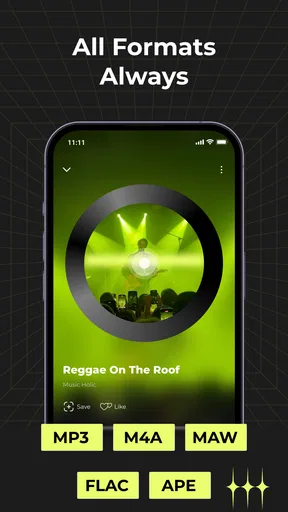
Rhythm Music - Offline Player supports a wide range of audio formats, including MP3, AAC, FLAC, and WAV. This ensures that users can play their music library without needing to convert files, providing a seamless listening experience regardless of the format of their music files.
Are there any in-app purchases or subscription fees?
While Rhythm Music - Offline Player offers a free version with basic features, there are in-app purchases available for premium features. These may include ad-free listening, advanced equalizer settings, and additional themes. Users can choose to purchase these features to enhance their music experience.
How user-friendly is the interface of Rhythm Music - Offline Player?
Rhythm Music - Offline Player boasts a highly intuitive and user-friendly interface. The app is designed with easy navigation in mind, allowing users to quickly access their playlists, search for songs, and customize their listening experience without any hassle. Even first-time users will find it straightforward to use.


